




How will the amaze transaction fees be displayed on my app?
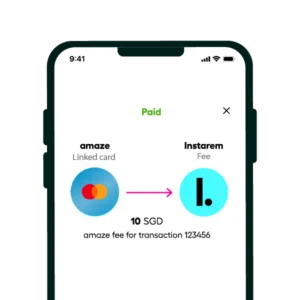
The 1% fee applied to domestic transactions via linked card will be displayed as the second entry on the specific transaction, like so:
On the activity screen in-app
On your card statement
1st entry: Original transaction
Displayed as the original transaction.
Displayed as “amaze card” followed by the transaction description.
2nd entry: 1% amaze fee
Displayed as “amaze fee” followed by the transaction description.
Displayed as “amaze card” followed by the transaction description.
For example:
Related FAQs
Didn’t find what you were looking for?
Have a Personal Instarem account?
- Log in to your account on the Instarem app or web.
- Go to your Profile section.
- Tap on Help.
- Search for the relevant topic.
- Raise a ticket or chat with us if you didn’t find what you were looking for.
Have a Business Instarem account?
- Log into your account on the Instarem business portal.
- Tap on Help.
- Search for the relevant topic.
- You can raise a ticket by:
- Clicking Submit a request at the top-right corner of the Help Centre page, or
- Clicking Raise a ticket after selecting a topic or FAQ.
- We’ll get back to you once your request is submitted.


